


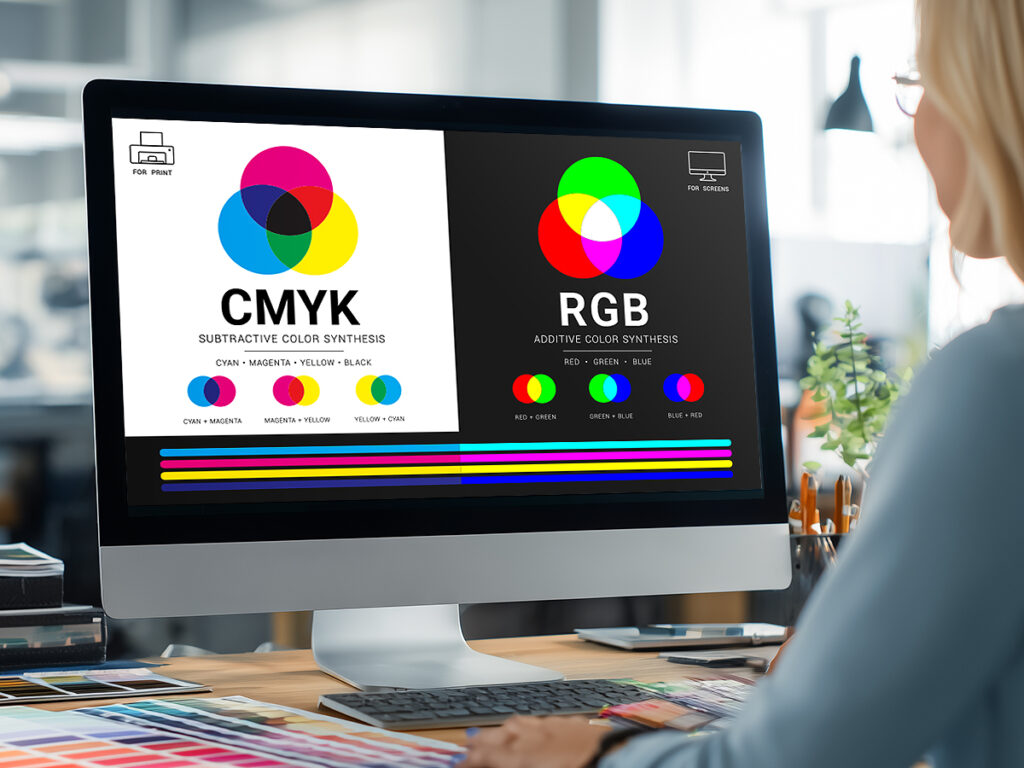
Anyone who has ever dealt with computer graphics has probably encountered terms such as CMYK or RGB. What are they, and how do they make it possible to obtain specific colours? CMYK or RGB for printing — which model should you choose? We explain.
RGB colour palette – the domain of electronic devices
What is RGB? The RGB colour model is a method of colour representation used in electronic devices equipped with displays. These devices emit light, and the final colour depends primarily on the proper mixing of the base colours:
- red, marked as R,
- green, marked as G,
- blue, marked as B.
Combining these three colours in different proportions makes it possible to obtain a wide range of secondary colours. This is possible thanks to the optical properties of the human eye, which does not distinguish the individual components of the final colour, but perceives them as a properly mixed whole. This solution is used, among others, in televisions, LCD screens, smartphones and tablets. Therefore, it should be remembered that the final shade of the emitted light also depends on the spectral characteristics of a given device.
What is CMYK?
CMYK is the colour model used in printing. What is CMYK in practice? It is an acronym created from the first letters of the component colours, which include:
- cyan (C) – a light blue colour,
- magenta (M) – a pink colour,
- yellow (Y) – a yellow colour.
The CMYK model also includes the K component (black), responsible for the depth of black and tonal stability of the print.
The CMYK colour palette is defined in percentages from 0 to 100% for each component colour. The higher the ink coverage for individual components, the darker or more saturated the final effect may be.
CMYK colours – examples of colour combinations in the CMYK system
An intense red in CMYK is obtained mainly by combining magenta and yellow, but the exact proportions depend on the ICC profile and the characteristics of the printing device. In the same way, green can be created by combining cyan and yellow. Orange, in turn, is obtained by combining yellow and magenta.
CMYK technology in practice – how does it work?
CMYK technology allows a wide range of colours suitable for printing, but its range is limited compared to the RGB space.
The quality of colour reproduction in CMYK is also affected by the use of halftone screening. In simple terms, this involves placing very small dots of different sizes or densities, which makes it possible to simulate tonal transitions and different levels of colour saturation. The density of the dots, combined with the way they are arranged, affects how the final print looks.
CMYK and RGB technology – the key differences
Although both colour sets may seem similar, the difference between CMYK and RGB is quite significant. The first and most important issue is, of course, the palette of component colours. Another difference is — in the case of RGB — a much wider range of colours and their intensity.
In printing, final designs are prepared in the CMYK space, but many projects are originally created in RGB and are converted only at the stage of preparing files for print.
CMYK:
- Enables obtaining a wide range of colours suitable for printing.
- Is the standard colour space in printing, because it corresponds to the physical process of applying ink to paper.
Can RGB be converted to CMYK?
We already know when to use CMYK and when it is worth using RGB technology. Is it possible to convert a graphic file from RGB to CMYK and vice versa? Yes. Colour space conversion is performed using Adobe applications, most often InDesign or Illustrator, and in the case of raster graphics — Photoshop. For most standard colour prints, the recommended profile is Coated FOGRA39 (ISO Coated v2), while for black-and-white prints Gray Gamma 1.8 or Gray Gamma 2.2 profiles are used.
Many modern printing houses provide their customers with ICC profiles of the device on which the print will be produced. The profile should be installed in the system so it can be used by graphic software. Thanks to the ICC profile, soft proofing is possible, which means a preview simulating the appearance of CMYK colours even if the file still remains in RGB space.
CMYK or RGB for printing – choose correctly!
In summary, choosing the right colour space often raises the question of which of the above standards should be used, and — importantly — there is not always one clear answer. If the graphic is intended for the web, the situation seems simple — RGB remains the standard. The situation becomes more complicated when printing is planned. The differences that occur during conversion between RGB and CMYK (and vice versa) may affect the final appearance of colours.
To avoid unwanted colour changes, it is worth consulting the project with an experienced printing team. They will help select a safe solution — both when converting RGB to CMYK and when preparing files for print.